Showing posts with label printers. Show all posts

Tuesday, May 20, 2014

Getting books printed online and overseas

Another option for getting your book printed is checking out overseas printing companies and online printing services (which generally mean overseas printing for us here in Australia).

Overseas Printing Companies
Printing companies in places like China work the same way as going to a local printer but are sometimes cheaper, and although I've never tried myself, I've heard mixed reviews of them, with some people saying the outcome was fairly average, and others saying they got exactly what they wanted with no problems.

Online Printing Services
There are also many online printing websites, like Blurb or CreateSpace (owned by Amazon), that allow you to design your book within their software then print on demand. They also give you the option to sell through their websites.

But there are two things you do need to know before you go ahead with an overseas print, and it's got nothing to do with which printer or the quality. It's all about delivery.

If you order from another country you, and the printing company don't have any control of when you get your books, this includes any samples and the final print. You also have to take into account the possibility your book will be delayed in customs. If you are planning a launch for your book I suggest not organising the launch date until you have the books sitting in your livingroom/office ready to be sold.

The second thing you need to do is research import taxes. If you are receiving more than AU$1000 of goods (using the conversion rate on the date of export) you will need to pay duty on the book cost, and then GST on the 'VoTI' which is the price of the books, duty and postage. This sometimes makes the cost of your books the same as or more than having them printed locally.
You can find out more about import taxes, and example calculations, at: http://www.customs.gov.au/site/page5549.asp#Calculating

The benefit of using an online printing service is you don't need to order hundreds or thousands at a time. You can order as little as one and as many as you would like. Most online printing services also have an online store or are connected to Amazon where you can list your book for sale and they look after the printing/distribution. Which means if people are ordering from a country other than Australia the postage is often quicker and cheaper for them as well.

If you see the benefits of printing your book both in Australia for the Australian market, and online for international orders then definitely do both!

*this article has affiliate links

Tuesday, April 8, 2014

Choosing a printer - Part 2: Meeting printers and getting quotes

Depending on whether you're doing the layout of your book yourself and going directly to the printer or working with a layout/typesetter it's good to get quotes from a few different printers.

If you're working with a layout/typesetter they will be able to talk to you through what you need to know and get quotes for you, but if you're working directly with a printer here are a few tips to get an accurate quote and start building a good relationship.

First it's a good idea to meet with some printers and get quotes before you start on the layout of your book. You will probably have a rough idea what you want your book to look like, what size it will be, whether you want colour inside or greyscale and approximately how many pages it will have. So write that all down and take it with you.

If you have a book at home that you want your book to look similar to (in relation to size and paper quality) take that with you.

Various book shapes and sizes (L-R: A4 portrait, square, A4 landscape, A5 portrait).

There are a few things your printer will want to know to give you a quote:
  • What size will the finished book be
  • How many pages will it have (pages are in multiples of 4, or 2 if it's going to be spiral bound), this can be an approximate for now
  • How it will be bound (stapled, spiral bound, glued, etc)
  • What thickness will the cover be
  • What thickness will the inner pages be
  • What finish will the cover have (matt, gloss, silk etc)
  • Will the cover be colour or greyscale
  • Will the inside pages be colour or greyscale
  • How many copies do you want
If you don't know what you prefer or don't understand what some of these terms are the printer will be able to show you samples so you understand and can figure out which you like better.
I'll also be going in to all these things in later posts.

You can ask for multiple quotes to get an idea how much the price will change. For example you may ask for two quotes, the book details exactly the same, but 500 copies in one quote and 1000 copies in another.

So what do you need to know from the printer?
  • Do they create proofs. Some printers will give you a proof copy to sign off on, others you will have to ask to provide this as they may not automatically create one for you. A proof allows you to double check the layout and make sure the images you've provided are good quality before they print hundreds and you realise there is an issue.
  • How long does it take for your book to be ready. This is especially useful if you're running to a launch deadline as it will help you work out when you need to give them the layout by.
  • Find out if they print or outsource. Some businesses will say they can print your book, but they actually outsource it. While there is nothing wrong with this you should be aware it will put a bit extra on the cost (for their time), and it may make the process a bit longer than normal as files, proofs and final copies have to go through them.
These days self publishing is quite common and most printers are happy to meet and explain the process, help you choose paper and show you samples to help make your decision. I may be annoying a few printers here, but if a printer isn't willing to take the time to talk to you then I would be considering someone else to print your book. Working with a printer that is happy to explain things will make it less stressful for you and get you the final product that you want.

Tuesday, April 1, 2014

Choosing a printer - Part 1: Traditional or Digital Print

Quick note: This post focuses on finding a local printer, I won't be covering online or office supply businesses.

There are two types of printers that print books, traditional printing (also called offset printing) and digital printing. Depending on the quantity you want printed you will find a large difference in quote price. You may also find, depending on the physical size of your book, some printers won't be able to print it.

Traditional printing is done by a huge press, like the type you see printing newspapers. It can print larger books but has a longer set up time so smaller quantities will be quite expensive per book. Generally they won't print less than 500 copies on a traditional press, and it becomes more cost effective once you print 1000 or more.

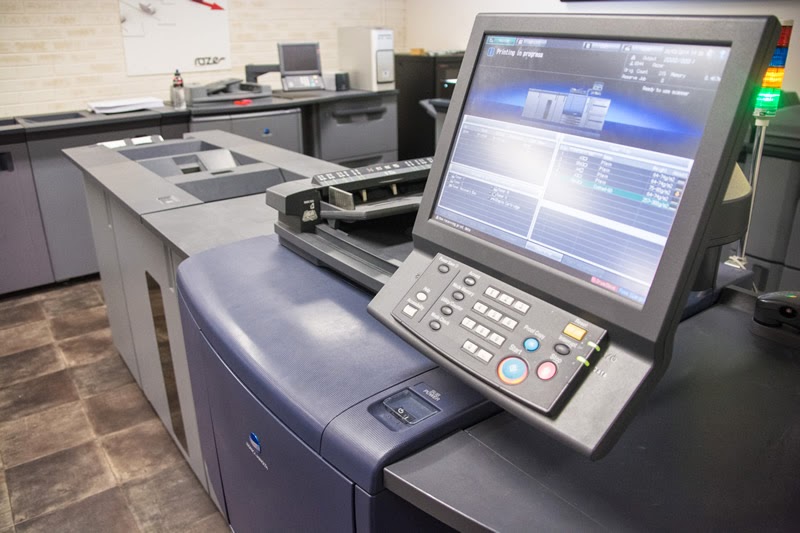
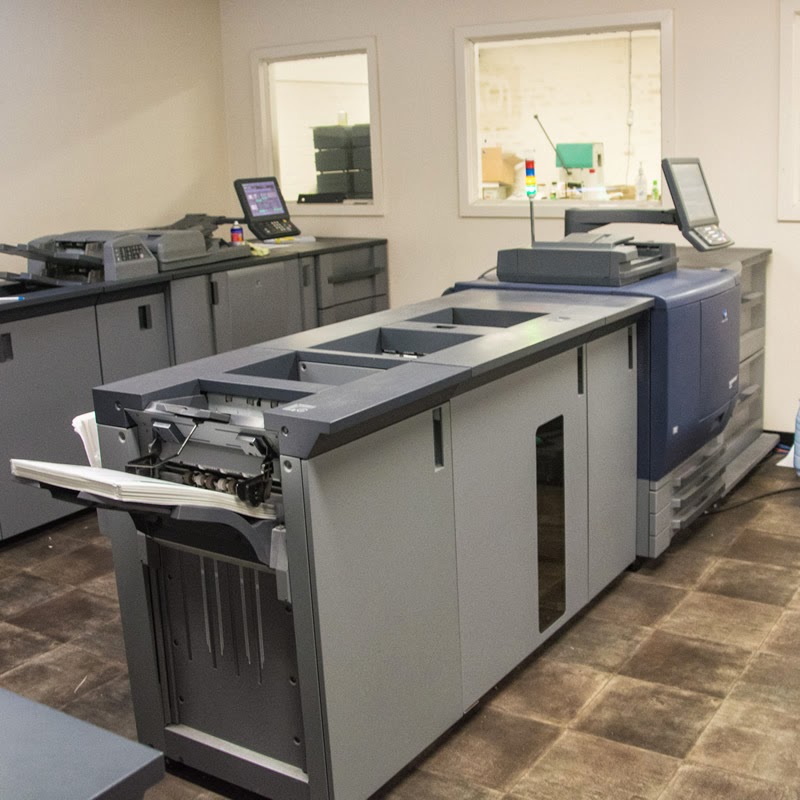
Digital printing is done with a large computerised printer. It's slightly more limited in the physical size it can print, for example an A4 size book bound on the short side; so it is A4 size but landscape orientated; is too wide to print, however A4 size bound on the long side; making it A4 portrait; is fine (I'll go into more detail of this in a later blog post). As digital printers don't have a long setup like traditional press, it's a lot cheaper per book if you want a smaller quantity printed. They should also be happy to quote if you want less than 500, including, 20 50, 100, 200 etc.

Digital Printer
A lot of people assume that digital printing is a desktop printed connected to a computer, but as you can see in the photos below, they're a lot larger than that!


This may vary depending which country or state you're in, but here are some things I've found when getting quotes.
- Digital printing is generally cheaper per book until you get to about 2000-3000 copies, then it evens out to be roughly the same.
- A lot of traditional printers also have digital printing capabilities, and will quote you based on which system can print your book at the most cost effective price.

Thank you to M4Media whose photos I've used, and Razer Graphix who let us take photos of their digital press.