There's a little bit of homework for you to do in this post, but it will save you time and stress in the future!
I get a lot of emails and phone calls telling me the person contacting me has received an invoice for their domain name or hosting and they're not sure if they should pay it because they can't remember who they originally registered with. Normally this would be easy, you get an invoice for services you're using, you pay it and life continues. But in the domain name industry it can be a bit shady. A few companies see your domain name is up for renewal in 4 months and send you a letter telling you when it's due. They also say if you swap to them they would charge a certain amount, but they lay out the letter so it looks like an invoice. We're often too busy to sit down and figure out if it is actually who we owe money to or not that we assume it's fine as it looks official, and we only pay once every year or two so remembering who we originally registered with is difficult. By paying the invoice we've allowed them to swap our domain name to them and often are charged a lot more.
So this week I'll be helping you figure out what invoices you should pay when it comes to your website, and which ones are other businesses trying to get you to swap to them and charge you more.
I want you to make a website folder for your filing cabinet if you don't already have one.
Get two pieces of paper.
The first one is for your Domain Name.
Write down on it:
- Your domain name
- Who your domain name is registered with. This will be the company you originally asked to set it up for you. It may be an IT company like MelbourneIT or SmartyHost, or it may be a web designer like myself.
- How much you pay for your domain name renewal.
- How long you renew your domain name for (it's usually 1 or 2 years at a time, but there are options for more so make note).
- When you last paid for your domain name renewal (this will allow you to easily work out when it's up for renewal next, eg last paid: July 2012 for 2 years means your next payment will be due July 2014).
The second piece of paper is for your website hosting.
Write down on it:
- Who you registered your website hosting with (again it will be a hosting company or your web designer).
- How much you pay for your hosting.
- How long you renew your hosting for (again it's generally 1 or two years at a time).
- When you last paid for your hosting renewal.
If you're unsure of any of these details:
Ask your web designer (if you have one) as they should be able to help you with at least some of the details.
Look through your old emails and invoices
Ask your accountant or look through your accounting program as they should hold the details of who you paid and how much you paid them.
Next time you get an invoice for your domain name or hosting you will be able to
easily check if the company is the same company you originally
purchased from, and if the price is the same you normally charge.
If the company name and price are entirely different you can ignore it.
If both the company and price are the same, it's fine to pay.
If
the company or price is different but the other one is the same, check
it out. It may be they have changed their prices, or the company has
changed names or merged with another company - they generally email
their customers when they do this to warn you of new invoicing details
(don't forget to update your file if they do this).
If you receive an invoice and are still unsure, don't be afraid to ask someone!
Friday, October 11, 2013

Tuesday, August 20, 2013
Make an easy url for your facebook page
If you've just set up a Facebook page for your business or product you will find that the link to your page (the url people have to type in to the internet browser) is quite long and not at all memorable. It will be something like www.facebook.com/pages/yourpagename/1234567891234567 but you are able to change this to something easier like www.facebook.com/yourpagename
Make sure you are logged in to Facebook then visit www.facebook.com/username
Here you can set a username for your personal page (the one you see all your friends posts), and your facebook business page.
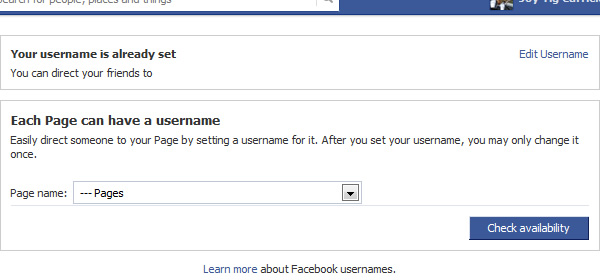
First, choose your business page from the drop down menu.
Type the name you would like your page to be found as.
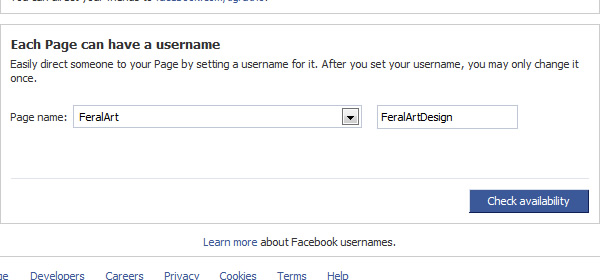
Press the Check Availability button, this will check if anyone else already has the url you would like to be found for. As there are millions of profiles and business pages you may find you don't get your ideal username (I couldn't get FeralArt for example as someone already has it), so you may have to brainstorm a bit to find something appropriate and memorable.
Once you've found a name available you will get a popup window, this lets you know you can't take someone elses trademark, you can't sell usernames etc. But it's also worth noting if you choose to change the username/url of your page in the future you can only do this once.
Once confirmed your username is set up.
Make sure you are logged in to Facebook then visit www.facebook.com/username
Here you can set a username for your personal page (the one you see all your friends posts), and your facebook business page.
Type the name you would like your page to be found as.
Press the Check Availability button, this will check if anyone else already has the url you would like to be found for. As there are millions of profiles and business pages you may find you don't get your ideal username (I couldn't get FeralArt for example as someone already has it), so you may have to brainstorm a bit to find something appropriate and memorable.
Once you've found a name available you will get a popup window, this lets you know you can't take someone elses trademark, you can't sell usernames etc. But it's also worth noting if you choose to change the username/url of your page in the future you can only do this once.
Once confirmed your username is set up.
Subscribe to:
Posts (Atom)